


Activating a Setting
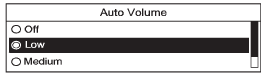
1. Turn the Menu knob to highlight the setting.
2. Press SELECT to activate the setting.
See also:
Warranty
OnStar equipment may be
warranted as part of the new-vehicle
limited warranty. The manufacturer
of the vehicle furnishes detailed
warranty information. ...
Tire Pressure Monitor System
The Tire Pressure Monitor System (TPMS) uses
radio and sensor technology to check tire pressure
levels. TPMS sensors are mounted on each tire
and wheel assembly, except the spare tire.
The TPMS ...
How to Inspect the Engine AirCleaner/Filter
To inspect the air cleaner/filter remove the filter
from the vehicle and lightly shake the filter to
release loose dust and dirt. If the filter remains
caked with dirt, a new filter is required.
...