


Turn and Lane-Change Signals
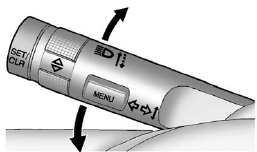
Turn and Lane-Change Signals
Move the lever all the way up or down to signal a turn.
An arrow on the instrument panel cluster flashes in the direction of the turn or lane change.
Raise or lower the lever until the arrow starts to flash to signal a lane change. Hold it there until the lane change is completed. If the lever is briefly pressed and released, the turn signal flashes three times.
The turn and lane-change signal can be turned off manually by moving the lever back to its original position.
If after signaling a turn or lane change the arrow flashes rapidly or does not come on, a signal bulb might be burned out.
Have the bulbs replaced. If the bulb is not burned out, check the fuse.
See Fuses and Circuit Breakers.
See also:
Erasing Speed Memory
The cruise control set speed memory is erased by
turning off the cruise control or the ignition. ...
Using Universal Home Remote
Press and hold the appropriate button for at least
half of a second. The indicator light will come on
while the signal is being transmitted. ...
Additional Program
Information
All program options, such as shuttle
service, may not be available at
every dealer. Please contact your
dealer for specific information
about availability. All Courtesy
Transportation arrang ...