


Lumbar Adjustment
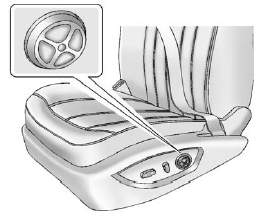
Lumbar Adjustment
If available, press and hold the front or rear of the control to increase or decrease lumbar support.
To raise or lower lumbar support, press and hold the top or bottom of the control.
Release the control when the seatback reaches the desired level of lumbar support.
See Power Seat Adjustment for more information.
See also:
Hazard Warning Flashers
(Hazard Warning Flasher): Press
and momentarily hold this button located on the instrument panel above the climate
control system, to make the front and rear turn signal lamps flash on and off. ...
Halogen Bulbs
WARNING:
Halogen bulbs have pressurized gas inside and
can burst if you drop or scratch the bulb. You or
others could be injured. Be sure to read and follow
the instructions on the bulb package ...
Service Parts Identification Label
This label, located either in the glove box or the trunk area, has the following
information:
Vehicle Identification Number (VIN).
Model designation.
Paint information.
Production options ...