


Check Engine Light
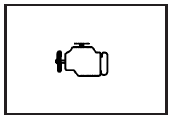
Your vehicle has a computer which monitors operation of the fuel, ignition, and emission control systems.
This system is called OBD II (On-Board Diagnostics-Second Generation) and is intended to assure that emissions are at acceptable levels for the life of the vehicle, helping to produce a cleaner environment. The check engine light comes on to indicate that there is a problem and service is required. Malfunctions often will be indicated by the system before any problem is apparent. This may prevent more serious damage to your vehicle. This system is also designed to assist your service technician in correctly diagnosing any malfunction.
Notice: If you keep driving your vehicle with this light on, after awhile, your emission controls may not work as well, your fuel economy may not be as good, and your engine may not run as smoothly. This could lead to costly repairs that may not be covered by your warranty.
Notice: Modifications made to the engine, transmission, exhaust, intake, or fuel system of your vehicle or the replacement of the original tires with other than those of the same Tire Performance Criteria (TPC) can affect your vehicle’s emission controls and may cause this light to come on. Modifications to these systems could lead to costly repairs not covered by your warranty. This may also result in a failure to pass a required Emission Inspection/Maintenance test.
This light should come on, as a check to show you it is working, when the ignition is on and the engine is not running. If the light does not come on, have it repaired. This light will also come on during a malfunction in one of two ways:
• Light Flashing — A misfire condition has
been detected. A misfire increases vehicle
emissions and may damage the emission
control system on your vehicle. Diagnosis and
service may be required.
• Light On Steady—An emission control
system malfunction has been detected on
your vehicle. Diagnosis and service may
be required.
See also:
Purposeful technology
Comprehensive connectivity is enabled by OnStar's remote vehicle access,
which makes keeping tabs on the vehicle a breeze from anywhere with a smart
phone. Highlights include:
Passive entry
Hea ...
FCC Information
See Radio Frequency Statement for FCC
information.
Frequency of operation: 24.05GHz – 24.25GHz
Field Strength: Not greater than 2.5V/m peak
(0.25V/m average) at a distance of 3 m.
The manufac ...
Safety Belt Use During Pregnancy
Safety belts work for everyone, including pregnant women. Like all occupants,
they are more likely to be seriously injured if they do not wear safety belts.
A pregnant woman should wear a lap-sho ...