


Cruise Control
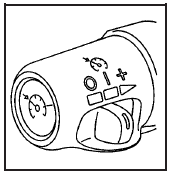
Your vehicle has cruise control. The controls are located on the end of the turn signal/ multifunction lever.
 (On): Move the switch to
this position to turn
the cruise control system on.
(On): Move the switch to
this position to turn
the cruise control system on.
 (Resume/Accelerate): Move
the switch to this
position to resume a set speed or to accelerate.
(Resume/Accelerate): Move
the switch to this
position to resume a set speed or to accelerate.
 (Set): Press this button,
located at the end of
the lever, to set a speed.
(Set): Press this button,
located at the end of
the lever, to set a speed.
 (Off): Move the switch to
this position to turn
the cruise control system off and cancel memory
of a set speed.
(Off): Move the switch to
this position to turn
the cruise control system off and cancel memory
of a set speed.
With cruise control, you can maintain a speed of about 25 mph (40 km/h) or more without keeping your foot on the accelerator. This can really help on long trips. Cruise control does not work at speeds below about 25 mph (40 km/h).
If you apply the brakes, the cruise control shuts off.
CAUTION:
Cruise control can be dangerous where
you cannot drive safely at a steady speed.
So, do not use your cruise control on
winding roads or in heavy traffic.
Cruise control can be dangerous on
slippery roads. On such roads, fast
changes in tire traction can cause
excessive wheel slip, and you could lose
control. Do not use cruise control on
slippery roads.
CAUTION:
If you leave your cruise control on when
you are not using cruise, you might hit a
button and go into cruise when you do
not want to. You could be startled and
even lose control. Keep the cruise control
switch off until you want to use
cruise control.
See also:
Finding a Program Type (PTY) Station(RDS and XM™)
To select and find a desired PTY perform the
following:
1. Turn the P-TYPE knob to select a PTY.
2. Once the desired PTY displays, press the
SEEK TYPE button to select and go to the
PTY’s fir ...
Compass Variance (Zone) Procedure
1. Do not set the compass zone when the vehicle is
moving. Only set it when the vehicle is in P (Park).
Press the vehicle information button until PRESS
TO CHANGE COMPASS ZONE displays.
2. Fi ...
ENGINE OIL LOW — ADD OIL
This message displays when the
engine oil level is too low. Check the
oil level. See Engine Oil. ...