


Rear Safety Belt Comfort Guides
Rear shoulder belt comfort guides may provide added safety belt comfort for older children who have outgrown booster seats and for some adults. When installed on a shoulder belt, the comfort guide positions the belt away from the neck and head.
There is one guide for each outside passenger position in the rear seat. Here is how to install the comfort guide to the shoulder belt:
1. Slide the guide off of its storage clip located between the interior body and the seatback.
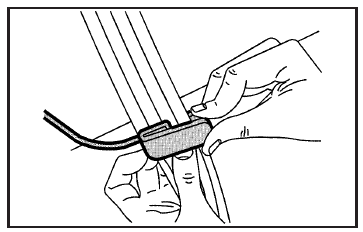
2. Slide the guide under and past the belt.
The elastic cord must be under the belt.
Then, place the guide over the belt and insert the two edges of the belt into the slots of the guide.
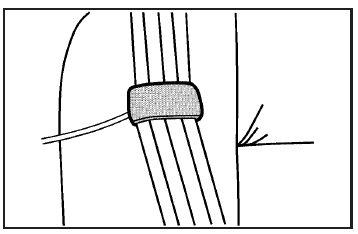
3. Be sure that the belt is not twisted and it lies flat. The elastic cord must be under the belt and the guide on top.
CAUTION:
A safety belt that is not properly worn may
not provide the protection needed in a
crash. The person wearing the belt could
be seriously injured. The shoulder belt
should go over the shoulder and across
the chest. These parts of the body are best
able to take belt restraining forces.
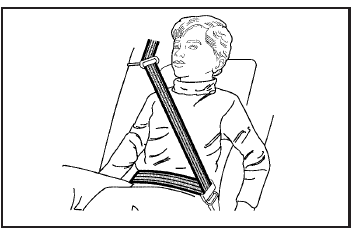
4. Buckle, position, and release the safety belt as described in Rear Seat Passengers on page 33. Make sure that the shoulder belt crosses the shoulder.
To remove and store the comfort guide, squeeze the belt edges together so that you can take them out of the guide. Slide the guide back onto its storage clip located between the interior body and the seatback.
See also:
Canceling a Remote Start
To cancel a remote start:
• Aim the RKE transmitter at the vehicle and press
and hold until the parking lamps
turn off.
• Turn on the hazard warning flashers.
• Turn the ignition switch ...
Wheel Replacement
Replace any wheel that is bent, cracked, or badly rusted
or corroded. If wheel nuts keep coming loose, the
wheel, wheel bolts, and wheel nuts should be replaced.
If the wheel leaks air, replace i ...
Changing a Flat Tire
If a tire goes flat, avoid further tire and wheel
damage by driving slowly to a level place. Turn on
your vehicle’s hazard warning flashers.
CAUTION:
Changing a tire can be dangerous. The
veh ...