


Rear Seats
Rear Seat Operation
Your vehicle has flip and fold second row seats which provide additional cargo space.
To flip and fold the seat(s), do the following:
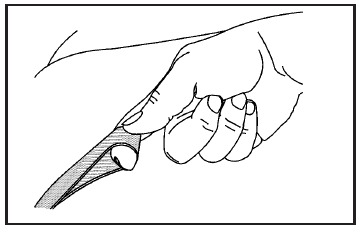
1. Pull up on the loop located where the seat cushion meets the seatback and flip the seat cushion forward.
Notice: Folding a rear seat with the safety belts still fastened may cause damage to the seat or the safety belts. Always unbuckle the safety belts and return them to their normal stowed position before folding a rear seat.
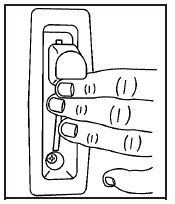
2. Lift the lever, located on the outboard side of the seatback, and fold the seatback forward.
The head restraint will automatically fold out of the way as the seatback is folded down.
To return the seat(s) to the original position, do the following:
CAUTION:
If the seatback is not locked, it could
move forward in a sudden stop or crash.
That could cause injury to the person
sitting there. Always push and pull on the
seatback to be sure it is locked.
1. Lift the seatback until it locks into the upright position. Push and pull on the seatback to make sure it is locked.
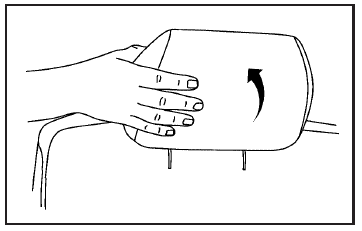
2. Return the head restraints to the upright position by reaching behind the seat and pulling it forward until it locks into place.
Push and pull on the head restraint to make sure that it is locked.
3. Flip the seat cushion back into place.
See also:
Air Vents
Use the louvers located on the air vents to change the direction of the airflow.
To open a vent, move the thumbwheel to | . To close the vent, move the thumbwheel to .
Operation Tips
► Keep a ...
What Makes an Airbag Inflate?
In an impact of sufficient severity, the airbag
sensing system detects that the vehicle is
in a crash. Additionally, in the case of a “rollover
capable” roof-mounted side impact airbag, the
se ...
Fuses and Circuit Breakers
The wiring circuits in the vehicle are protected from short circuits by a combination of fuses and circuit breakers. This greatly reduces the chance of damage caused by electrical problems.
To check ...