


Heated Seats
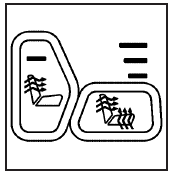
Your vehicle may have heated front seats.
The buttons used to control this feature are located on the front door armrests.
The engine must be running for the heated seat feature to work.
To heat the entire seat, press the horizontal button with the heated seat and seatback symbol.
Press the button to cycle through the temperature settings of high, medium, and low and to turn the heated seat off. The indicator lights above the button will come on to designate the level of heat selected: three for high, two for medium, and one for low. The low setting warms the seatback and seat cushion until the seat temperature is near body temperature. The medium and high settings heat the seatback and seat cushion to a slightly higher temperature. You will be able to feel heat in about two minutes.
To heat only the seatback, press the vertical button with the heated seatback symbol. An indicator light on the button will come on to designate that only the seatback is being heated.
Additional presses will cycle through the heat levels for the seatback only.
The feature will shut off automatically when the ignition is turned off.
See also:
Loading Your Vehicle
It is very important to know how much weight your
vehicle can carry. This weight is called the
vehicle capacity weight and includes the weight of
all occupants, cargo, and all nonfactory-installed
...
Headlamp Aiming
Headlamp aim has been preset at the factory and should need no further adjustment.
However, if the vehicle is damaged in a crash, the headlamp aim may be affected. Aim adjustment to the low-beam head ...
Interior Glass
To clean, use a terry cloth fabric dampened with water. Wipe droplets left behind
with a clean dry cloth. Commercial glass cleaners may be used, if necessary, after
cleaning the interior glass wit ...