


Maintenance Replacement Parts
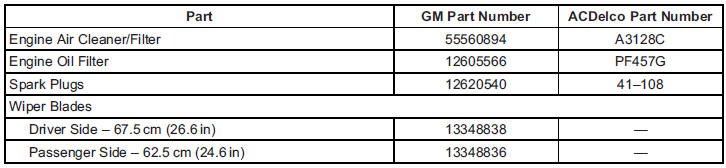
Replacement parts identified below by name, part number, or specification can be obtained from your dealer.
See also:
Remote Start Heated and
Ventilated Seats
During a remote start, the heated or
ventilated seats, if equipped, can be
turned on automatically. They are
canceled when the ignition is turned
on. Press the button to use the
heated or ve ...
Driving for Better Fuel Economy
Driving habits can affect fuel mileage. Here are some driving tips to get the
best fuel economy possible.
Avoid fast starts and accelerate smoothly.
Brake gradually and avoid abrupt stops.
A ...
Transmission Messages
SERVICE TRANSMISSION
This message displays if there is a problem with the transmission. See your dealer.
SHIFT TO PARK
This message displays when the transmission needs to be shifted to P (Park).
...