


Exterior Lamp Controls
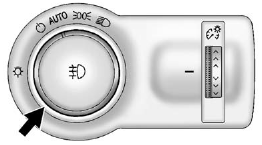
The exterior lamp control is located to the left of the steering column on the instrument panel.
It controls the following systems:
- Headlamps
- Taillamps
- Parking Lamps
- License Plate Lamps
- Instrument Panel Lights
- Fog Lamps
The exterior lamp control has four positions:
 (Off): Briefly turn to this position
to turn the automatic lamp control off or on again.
(Off): Briefly turn to this position
to turn the automatic lamp control off or on again.
AUTO (Automatic): Turns the headlamps on automatically at normal brightness, together with the following:
- Parking Lamps
- Taillamps
- License Plate Lamps
- Instrument Panel Lights
- Sidemarker Lamps
 (Parking Lamps): Turns the parking
lamps on together with the following:
(Parking Lamps): Turns the parking
lamps on together with the following:
- Taillamps
- License Plate Lamps
- Instrument Panel Lights
- Sidemarker Lamps
 (Headlamps): Turns the headlamps
on together with the lamps listed below. A warning chime sounds if the driver door
is opened when the ignition switch is off and the headlamps are on.
(Headlamps): Turns the headlamps
on together with the lamps listed below. A warning chime sounds if the driver door
is opened when the ignition switch is off and the headlamps are on.
- Parking Lamps
- Taillamps
- License Plate Lamps
- Instrument Panel Lights
- Sidemarker Lamps
 (Front Fog Lamps): For vehicles
with fog lamps, press to turn the lamps on or off.
(Front Fog Lamps): For vehicles
with fog lamps, press to turn the lamps on or off.
See Front Fog Lamps .
When the lights are on, will be lit.
See Lamps On Reminder .
will be lit.
See Lamps On Reminder .
See also:
Weight of the Trailer Tongue
The tongue load (A) of any trailer is an important
weight to measure because it affects the total
or gross weight of your vehicle. The Gross Vehicle
Weight (GVW) includes the curb weight of the
ve ...
Ultrasonic Parking Assist
For vehicles with this feature, it uses sensors on the
rear bumper to detect objects while parking the vehicle. It
operates at speeds less than 8 km/h (5 mph) while in
R (Reverse). URPA uses aud ...
Driving
The front-wheel-drive Verano gets a larger four-cylinder than the Cruze. It's
normally aspirated, as opposed to the Cruze's available turbocharged
four-cylinder, but it makes for smooth starts and ...