


Programming without a Recognized Transmitter (Keyless Access Vehicles Only)
If there are no currently recognized transmitters available, follow this procedure to program up to five transmitters. This feature is not available in Canada. This procedure will take approximately 30 minutes to complete. The vehicle must be off and all of the transmitters you wish to program must be with you.
1. Insert the vehicle key of the transmitter into the key lock cylinder located on the outside of the driver door and turn the key to the unlock position five times within 10 seconds. The Driver Information Center (DIC) displays REMOTE LEARN PENDING, PLEASE WAIT.
2. Wait for 10 minutes until the DIC displays PRESS ENGINE START BUTTON TO LEARN and then press the ignition. The DIC display will again show REMOTE LEARN PENDING, PLEASE WAIT.
3. Repeat Step 2 two additional times. After the third time all previously known transmitters will no longer work with the vehicle. Remaining transmitters can be relearned during the next steps.
The DIC display should now show READY FOR REMOTE # 1.
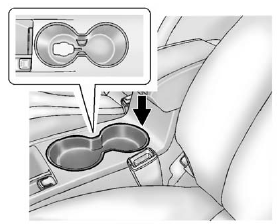
4. Place the new transmitter into the transmitter pocket with the buttons facing up. The transmitter pocket is located inside the center console cupholder. The cupholder liner will need to be removed to access the transmitter pocket. Use your finger or a tool in the notch at the rear of the cupholders to remove the liner. See Cupholders .
5. Press the ignition. When the transmitter is learned, the DIC will show that it is ready to program the next transmitter.
6. Remove the transmitter from the transmitter pocket and press
 .
.
To program additional transmitters, repeat Steps 4 through 6.
When all additional transmitters are programmed, press and hold the ignition for at least 10 seconds to exit programming mode.
See also:
Washing the Vehicle
To preserve the vehicle's finish, wash it often and out of direct sunlight.
Notice: Do not use petroleum based, acidic, or abrasive cleaning agents as they
can damage the vehicle's paint, m ...
If No Steam Is Coming from
the Engine Compartment
If an engine overheat warning is
displayed but no steam can be seen
or heard, the problem might not be
too serious. Sometimes the engine
can get a little too hot when the
vehicle:
• Climb ...
Brake System Messages
BRAKE FLUID LOW
This message is displayed when the brake fluid level is low. See Brake Fluid
.
PRESS BRAKE PEDAL TO RELEASE PARK BRAKE
This message is displayed if you attempt to release the elec ...