


Without Selective Ride Control
1. Move the shift lever to the left from D (Drive).
The transmission will enter Manual Mode. The DIC gear indicator will change to an M followed by a number representing the gear the vehicle is currently in.
2. In Manual Mode, press the shift lever forward to upshift or rearward to downshift.
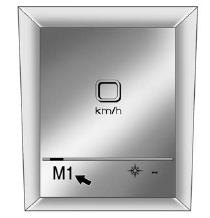
Uplevel Display Shown, Base Model Similar
The display on the instrument panel cluster will show which gear the vehicle is in. The number indicates the requested gear range when moving the shift lever forward or rearward.
The transmission will only allow you to shift into gears appropriate for the vehicle speed and engine revolutions per minute (rpm). The transmission will not automatically shift to the next lower gear if the engine rpm is too high, nor to the next higher gear when the maximum engine rpm is reached.
While in the DSC mode, the transmission will automatically downshift when the vehicle comes to a stop. This will allow for more power during take-off.
When accelerating the vehicle from a stop in snowy and icy conditions, you may want to shift into second gear. A higher gear allows you to gain more traction on slippery surfaces.
See also:
Windshield and Wiper Blades
Clean the outside of the windshield with glass cleaner.
Clean the rubber blades using a lint-free cloth or paper towel soaked with windshield washer fluid or a mild detergent. Wash the windshield tho ...
Driving with a Trailer
CAUTION:
If you have a rear-most window open and
you pull a trailer with your vehicle, carbon
monoxide (CO) could come into your
vehicle. You cannot see or smell CO.
It can cause unconsciousn ...
Rear Axle
When to Check Lubricant
It is not necessary to regularly check rear axle
fluid unless you suspect there is a leak or you hear
an unusual noise. A fluid loss could indicate a
problem. Have it inspe ...