


Adjusting the EQ (Equalizer)
Buick LaCrosse / Buick LaCrosse Owners Manual / Infotainment System / Introduction / Operation / Adjusting the EQ (Equalizer)
For vehicles with an equalizer:
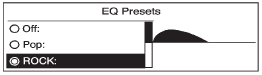
1. Press the TONE button.
2. Select EQ.
3. Select the setting.
Press the  BACK button to go
back to the Tone Settings menu.
BACK button to go
back to the Tone Settings menu.
See also:
Erasing Universal Home RemoteButtons
To erase programming from the three Universal
Home Remote buttons do the following:
1. Press and hold down the two outside buttons
until the indicator light begins to flash, after
20 seconds. Do ...
Other Information
The Bluetooth word mark and logos
are owned by the Bluetooth® SIG,
Inc. and any use of such marks by
General Motors is under license.
Other trademarks and trade names
are those of their resp ...
Rear Storage
Pull down the armrest. Push the button to lift the cover. Close the cover before folding the armrest up. ...