


Setting a Value
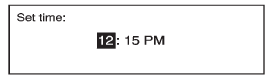
1. Turn the Menu knob to change the current value of the setting.
2. Press SELECT to confirm the setting.
See also:
Mixed-Band Presets
Each page can store six preset
stations. The presets within a page
can be from different radio bands.
To scroll through the pages, press
the FAV button located on the
faceplate or the FAV scr ...
Interactive Drive Control System
Buick Regal's Interactive Drive Control System chassis technology (available
on models with the available 2.0L turbo engine) offers enhanced vehicle
stability and greater driving safety. It is des ...
Windshield Replacement
Your vehicle is equipped with an acoustic
windshield. If you ever have to have your
windshield replaced be sure to get an acoustic
windshield so you will continue to have the benefits
an acoustic ...