


Instrument Panel Illumination Control
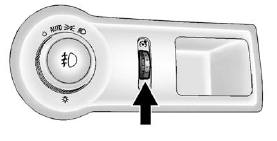
Instrument Panel Illumination Control
The brightness of the instrument panel lighting and steering wheel controls can be adjusted.
 (Instrument Panel
Illumination): Move and hold the
thumbwheel up or down to brighten
or dim the lights.
(Instrument Panel
Illumination): Move and hold the
thumbwheel up or down to brighten
or dim the lights.
See also:
Rear Window Lockout
This feature prevents the rear passenger windows from operating, except from
the driver position. The rear door locks will also be disabled and only operate
from the driver door. This feature on ...
Recommended Fuel
Use regular unleaded gasoline with a posted octane rating of 87 or higher. If
the octane rating is less than 87, an audible knocking noise, commonly referred
to as spark knock, might be heard when ...
Accessory Power Outlet(s)
With the accessory power outlets, you can plug in
auxiliary electrical equipment such as a cellular
telephone or CB radio.
Your vehicle has three accessory power outlets.
There are two outlets ...