


Driver Efficiency Gauge
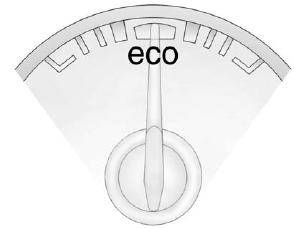
For eAssist vehicles, this gauge assists in driving efficiently and will vary based on driver input.
To maximize efficiency, keep the gauge pointed in the solid green zone in the center of the gauge.
The gauge moves to the left when braking and to the right when accelerating. When either is done aggressively, the vehicle is being driven less efficiently and the gauge will move further from the center.
See also:
Halogen Bulbs
WARNING!
Halogen bulbs have pressurized
gas inside and can burst if you
drop or scratch the bulb. You or
others could be injured. Be sure
to read and follow the instructions
on the bulb pac ...
Weatherstrips
Silicone grease on weatherstrips will make them last longer, seal better, and not stick or squeak. Apply silicone grease with a clean cloth.
During very cold, damp weather frequent application may be ...
Trip Odometer
A trip odometer show how far the vehicle has been
driven since the odometer was last set to zero.
See Driver Information Center (DIC) for
information on resetting the trip odometer. ...