


Universal Remote System
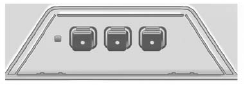
Universal Remote System
This system provides a way to replace up to three remote control transmitters used to activate devices such as garage door openers, security systems, and home automation devices.
Read the instructions completely before attempting to program the Universal Remote System. Because of the steps involved, it may be helpful to have another person available to assist you with programming the Universal Remote System.
See Universal Remote System.
See also:
Engine Cooling when Trailer
Towing
The cooling system may temporarily
overheat during severe operating
conditions. See Engine Overheating. ...
How to Check
Use a good quality pocket-type gage to check tire
pressure. You cannot tell if your tires are
properly inflated simply by looking at them. Radial
tires may look properly inflated even when
they’ ...
Selecting an XM Channel
XM channels can be selected by usings
or , the TUNE/ MENU knob, or the TUNE/MENU
system.
Selecting a Channel Using or
Press and release or
to go to the previous or next
channel.
P ...