


Instrument Panel
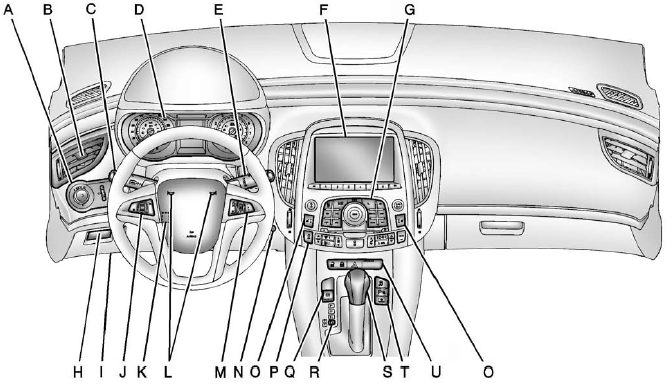
A. Exterior Lamp Controls.
Fog Lamps (If Equipped).
Instrument Panel Illumination Control.
Head-Up Display (HUD) (If Equipped).
B. Air Vents.
C. Turn and Lane-Change Lever.
See Turn and Lane-Change Signals.
Driver Information Center Buttons. See Driver Information Center (DIC).
D. Instrument Cluster.
Driver Information Center Display. See Driver Information Center (DIC).
E. Windshield Wiper/Washer.
F. Infotainment Display Screen.
G. Infotainment.
H. Front Storage.
I. Data Link Connector (DLC) (Out of View). See Malfunction Indicator Lamp.
J. Cruise Control.
K. Steering Wheel Adjustment.
L. Horn.
M. Steering Wheel Controls (If Equipped).
N. Ignition Positions (Key Access) or Ignition Positions (Keyless Access).
O. Heated and Ventilated Front Seats (If Equipped).
P. Automatic Climate Control System (If Equipped).
Dual Automatic Climate Control System (If Equipped).
Q. Parking Brake.
R. Shift Lever Position Indicator.
See Automatic Transmission.
S. Shift Lever. See Shifting Into Park.
T. Traction Control System (TCS).
StabiliTrak® System (If Equipped).
Ultrasonic Parking Assist.
Rear Window Sunshade (If Equipped).
U. Power Door Locks.
Hazard Warning Flashers.
Passenger Sensing System.
See also:
Global Positioning
System (GPS)
• Obstruction of the GPS can
occur in a large city with tall
buildings; in parking garages;
around airports; in tunnels,
underpasses, or parking
garages; or in an area with very
dense tr ...
Convex Mirrors
WARNING!
A convex mirror can make things,
like other vehicles, look farther
away than they really are. If you
cut too sharply into the right lane,
you could hit a vehicle on the
right. Chec ...
Rear Seat Armrest
This vehicle has a rear seat armrest with cupholders.
Pull the tab on the armrest forward, to access it. ...