


License Plate Lamp
To replace one of these bulbs:
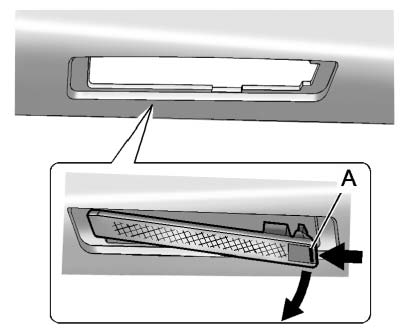 Passenger Side Shown, Driver Side Similar
1. Push the release tab (A) toward the lamp assembly.
2. Pull the lamp assembly down to remove.
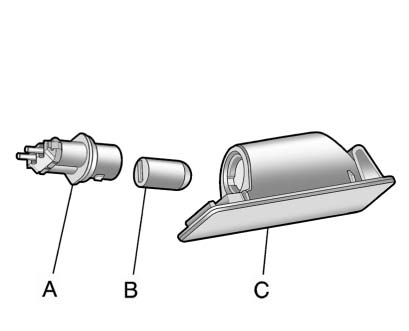
A. Bulb Socket
B. Bulb
C. Lamp Assembly
3. Turn the bulb socket (A) counterclockwise to remove it from the lamp assembly (C).
4. Pull the bulb (B) straight out of the bulb socket.
5. Push the replacement bulb straight into the bulb socket and turn the bulb socket clockwise to install it into the lamp assembly.
6. Push the lamp assembly back into position until the release tab locks into place.
See also:
Trailer Wiring Harness
Your vehicle is equipped with a seven-wire trailer
towing harness. This harness has a seven-pin
universal heavy-duty trailer connector (if equipped
with the trailering package) that is attached t ...
Removing the Flat Tire and Installing the Spare Tire
Take off the wheel cover or center cap, if the vehicle has one, to reach the wheel bolts.
1. Do a safety check before proceeding. See If a Tire Goes Flat for more information.
2. Turn the wh ...
Driving on Wet Roads
Rain and wet roads can reduce vehicle traction and affect your ability to stop
and accelerate. Always drive slower in these types of driving conditions and avoid
driving through large puddles and ...