


Traction Control System (TCS) Warning Light
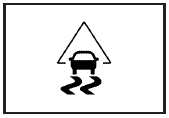
For vehicles with a Traction Control System (TCS) and StabiliTrak® warning light, this light comes on briefly when the engine is started.
If it does not, have the vehicle serviced by your dealer/retailer. If the system is working normally the indicator light then goes off.
When the system is active, the light flashes while the system is limiting wheel spin or assisting with controlling the vehicle.
If it stays on or comes on while driving a SERVICE TRACTION CONTROL message appears in the Driver Information Center (DIC). This indicates that there could be a problem with the traction control system and the vehicle may need service. When this warning light is on and the SERVICE TRACTION CONTROL message appears on the DIC, the system does not limit wheel spin.
If the traction control system is manually turned off, this light comes on and the TRACTION CONTROL OFF message appears on the DIC.
See Traction Control System (TCS) and DIC Warnings and Messages for more information.
See also:
Radio Frequency Statement
This vehicle has systems that operate on a radio
frequency that comply with Part 15 of the Federal
Communications Commission (FCC) Rules and with
RSS-210/211 of Industry and Science Canada.
Ope ...
Parking over Things That Burn
WARNING!
Things that can burn could touch
hot exhaust parts under the
vehicle and ignite. Do not park
over papers, leaves, dry grass,
or other things that can burn. ...
Pairing
A Bluetooth enabled cell phone must be paired to the
in-vehicle Bluetooth system first and then connected to
the vehicle before it can be used. See the cell phone
manufacturers user guide for Bl ...