


Manual Seats
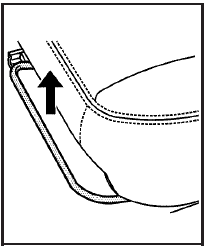
1. Lift the bar under the seat to unlock the seat.
2. Slide the seat to the desired position and release the bar.
Try to move the seat to be sure it is locked in place.
See Manual Seats.
See also:
SBZA Detection Zones
The SBZA sensor covers a zone of approximately one
lane over from both sides of the vehicle, 3.5 m (11 ft).
This zone starts at each side mirror and goes back
approximately 5 m (16 ft). The hei ...
Wheels and Trim—Aluminum
or Chrome
Use a soft, clean cloth with mild
soap and water to clean the wheels.
After rinsing thoroughly with clean
water, dry with a soft, clean towel.
A wax may then be applied.
Keep the wheels clean u ...
Gasoline Specifications
At a minimum, gasoline should meet ASTM specification
D 4814 in the United States or CAN/CGSB-3.5 or
3.511 in Canada. Some gasolines contain an
octane-enhancing additive called methylcyclopentad ...