


Instrument Panel
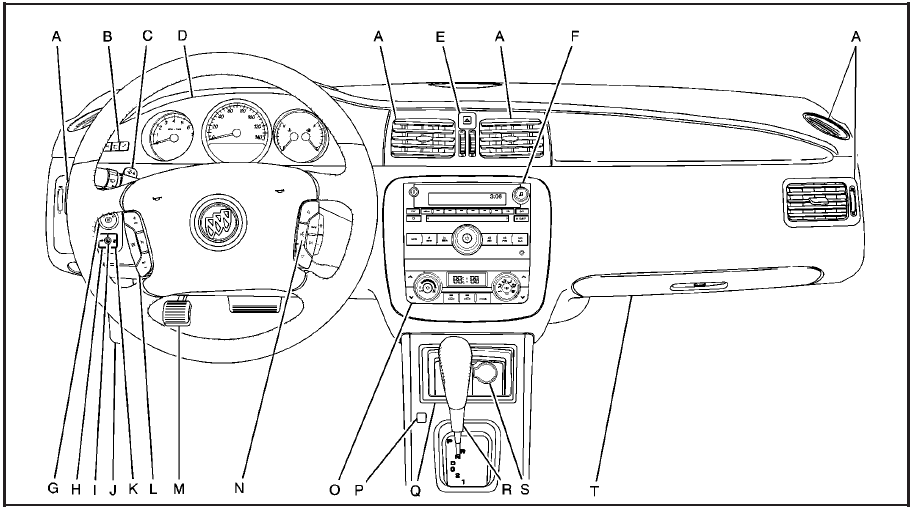
Instrument Panel
A. Outlet Adjustment.
B. DIC Operation and Displays (If Equipped).
C. Turn Signal/Multifunction Lever.
D. Instrument Panel Cluster.
E. Hazard Warning Flashers.
F. Audio System(s).
G. Exterior Lamps.
H. Trunk Release. See Trunk.
I. Instrument Panel Brightness.
J. Hood Release.
K. Lane Departure Warning (LDW) (If Equipped).
L. Cruise Control. Heated Steering Wheel (If
Equipped).
M. Parking Brake.
N. Audio Steering Wheel Controls (If Equipped).
O. Climate Control System or Dual Automatic Climate Control System .
P. Traction Control System (TCS) and StabiliTrak® System.
Q. Front Storage Area.
R. Shift Lever. See Automatic Transmission Operation.
S. Accessory Power Outlet(s).
T. Glove Box.
See also:
Tire Pressure Light
This light will come on
briefly when you turn
the ignition to RUN.
This light will also come on when one or more of
your tires are significantly underinflated.
A CHECK TIRE PRESSURE DIC mes ...
Cleaning the Video Screen
Pour some isopropyl or rubbing alcohol on a clean
cloth and gently wipe the video screen. Do not
spray directly onto the screen and do not press too
hard or too long on the video screen. ...
Power Lumbar
Your vehicle has power lumbar on the driver’s and
front passenger’s seats.
The seatback lumbar
support can be adjusted
by moving the control
located on the outboard
side of the seat
cushi ...