


Scheduled Maintenance
When the CHANGE ENGINE OIL DIC message comes on, it means that service is required for your vehicle. Have your vehicle serviced as soon as possible within the next 600 miles (1 000 km). It is possible that, if you are driving under the best conditions, the engine oil life system may not indicate that vehicle service is necessary for over a year. However, the engine oil and filter must be changed at least once a year and at this time the system must be reset.
Your GM Goodwrench® dealer has GM-trained service technicians who will perform this work using genuine GM parts and reset the system.
If the engine oil life system is ever reset accidentally, you must service your vehicle within 3,000 miles (5 000 km) since your last service.
Remember to reset the oil life system whenever the oil is changed.
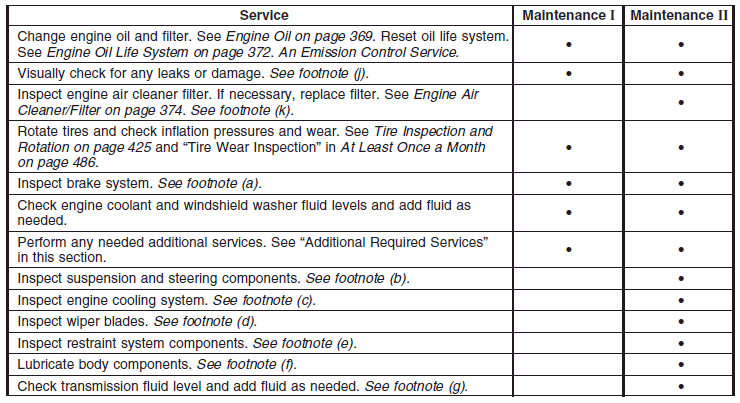
When the CHANGE ENGINE OIL DIC message appears, certain services, checks, and inspections are required. Required services are described in the following for “Maintenance I” and “Maintenance II.” Generally, it is recommended that your first service be Maintenance I, your second service be Maintenance II, and that you alternate Maintenance I and Maintenance II thereafter. However, in some cases, Maintenance II may be required more often.
Maintenance I — Use Maintenance I if the message comes on within 10 months since the vehicle was purchased or Maintenance II was performed.
Maintenance II — Use Maintenance II if the previous service performed was Maintenance I.
Always use Maintenance II whenever the message comes on 10 months or more since the last service or if the message has not come on at all for one year.
Scheduled Maintenance
See also:
Engine Cooling System Messages
A/C OFF DUE TO HIGH ENGINE TEMP
This message displays when the engine coolant becomes hotter than the normal operating temperature.
To avoid added strain on a hot engine, the air conditioning compre ...
All-Wheel Drive (AWD) System
Your vehicle may have this feature. There is no
lever or switch to engage or disengage the
front axle. It is fully automatic and adjusts as
needed for road conditions. Your vehicle has an
active t ...
Service Only Mode
This power mode is available for service and diagnostics, and to verify the proper
operation of the malfunction indicator lamp as may be required for emission inspection
purposes. With the vehicle ...