


Tire Inspection and Rotation
Tires should be rotated every 5,000 to 8,000 miles (8 000 to 13 000 km).
Any time you notice unusual wear, rotate your tires as soon as possible and check wheel alignment. Also check for damaged tires or wheels.
See When It Is Time for New Tires on page 426 and Wheel Replacement on page 432 for more information.
Make sure the spare tire is stored securely. Push, pull, and then try to rotate or turn the tire. If it moves, use the wheel wrench to tighten the cable.
For information on storing or removing the spare tire.
The purpose of regular rotation is to achieve more uniform wear for all tires on the vehicle. The first rotation is the most important.
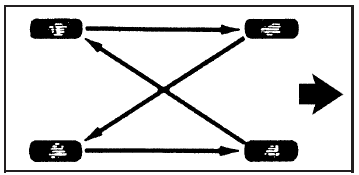
When rotating your tires, always use the correct rotation pattern shown here.
After the tires have been rotated, adjust the front and rear inflation pressures as shown on the Tire and Loading Information label.
The Tire Pressure Monitor System (TPMS) sensors will need to be reset after a tire rotation.
Make certain that all wheel nuts are properly tightened.
CAUTION:
Rust or dirt on a wheel, or on the parts to
which it is fastened, can make wheel nuts
become loose after time. The wheel could
come off and cause an accident. When
you change a wheel, remove any rust or
dirt from places where the wheel attaches
to the vehicle. In an emergency, you can
use a cloth or a paper towel to do this;
but be sure to use a scraper or wire brush
later, if needed, to get all the rust or dirt
off.
See also:
TPMS Malfunction Light and Message
The TPMS will not function properly if one or more of the TPMS sensors are missing
or inoperable. When the system detects a malfunction, the low tire pressure warning
light, defined above, flashes ...
Airbag Readiness Light
This light shows if there is an
electrical problem. The system
check includes the airbag sensor(s),
passenger sensing system, the
pretensioners, the airbag modules,
the wiring, and the crash ...
Disarming the System
To disarm the system, do one of the following:
Press on the RKE transmitter.
Approach the vehicle with the RKE transmitter (keyless access).
Start the engine.
The alarm automatically disar ...