


Turn and Lane-Change Signals
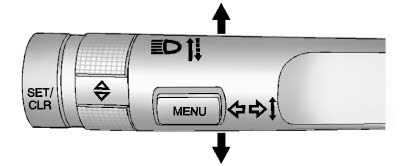
Move the lever all the way up or down to signal a turn.
An arrow on the instrument panel cluster flashes in the direction of the turn or lane change.
Raise or lower the lever until the arrow starts to flash to signal a lane change. Hold it there until the lane change is completed. If the lever is briefly pressed and released, the turn signal flashes three times.
The turn and lane-change signal can be turned off manually by moving the lever back to its original position.
If after signaling a turn or lane change, the arrow flashes rapidly or does not come on, a signal bulb might be burned out.
Have the bulbs replaced. If the bulb is not burned out, check the fuse.
See Fuses and Circuit Breakers .
See also:
Your Vehicle and the Environment
Proper vehicle maintenance not only helps to keep
your vehicle in good working condition, but also
helps the environment. All recommended
maintenance is important. Improper vehicle
maintenance can ...
Checking Things Under
the Hood
WARNING:
An electric fan under the hood can start up and
injure you even when the engine is not running.
Keep hands, clothing, and tools away from any
underhood electric fan.
WARNING:
Things t ...
Collision Damage Repair
If the vehicle is involved in a collision and it is damaged, have the damage
repaired by a qualified technician using the proper equipment and quality replacement
parts. Poorly performed collision ...