


Lower Anchor and Top Tether AnchorLocations
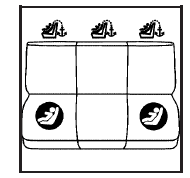
Second Row
 (Top Tether Anchor):
Seating positions with top tether anchors.
 (Lower Anchor):
Seating positions with two lower anchors.
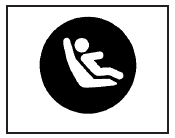
To assist you in locating the lower anchors, each seating position with lower anchors has two labels, near the crease between the seatback and the seat cushion.
The labels are located above a flap, at the base of the seatback, in the rear outside seating positions. The anchors are located under the flap.
In order to get to the anchors you will need to pull the strap at the center of the seat where the seat cushion meets the seatback. This will allow you to fold the seat cushion up and out of the way. Lift the flap to expose the anchors and then lower the seat cushion. Be sure the cushion is locked into place.
The top tether anchors for each rear seating position are located on the floor in the cargo area of your vehicle. Do not use the rear tie-down brackets near the liftgate for top tethers. Be sure to use an anchor located on the same side of the vehicle as the seating position where the child restraint will be placed.
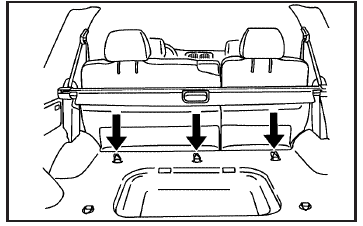
Do not secure a child restraint in the right front passenger’s position, if a national or local law requires that the top tether be attached, or if the instructions that come with the child restraint say that the top tether must be attached. There is no place to attach the top tether in this position.
Accident statistics show that children are safer if they are restrained in the rear rather than the front seat. See Where to Put the Restraint on page 52 for additional information.
See also:
Horn
Press on the steering wheel pad
to sound the horn. ...
Park Brake and P (Park) Mechanism Check
WARNING
When you are doing this check, the vehicle could begin to move.
You or others could be injured and property could be damaged.
Make sure there is room in front of the vehicle in case it b ...
Radio Frequency Identification (RFID)
RFID technology is used in some vehicles for functions such as tire pressure
monitoring and ignition system security, as well as in connection with conveniences
such as key fobs for remote door lo ...