


Steering Wheel Controls
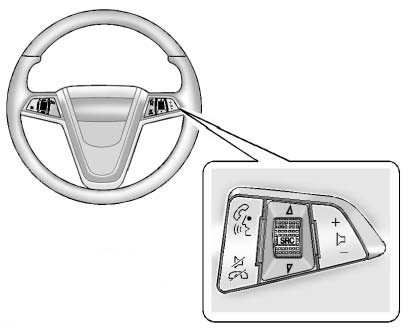
For vehicles with audio steering wheel controls, some audio controls can be adjusted at the steering wheel.
 (Push to Talk): For vehicles with a Bluetooth, OnStar, or navigation system, press to interact with those systems. See Bluetooth (Overview) or Bluetooth (Infotainment Controls) or Bluetooth (Voice Recognition) , the OnStar Owner's Guide, or the separate navigation manual for more information.
 (Mute/End Call): Press to silence the vehicle speakers only.
Press again to turn the sound on. For vehicles with OnStar or Bluetooth systems, press to reject an incoming call, or end a current call.
 (Rotary Control): Turn to select an audio source.
Press  to select the next or previous favorite radio station, CD, or MP3 track.
 (Volume): Press + to increase the volume. Press − to decrease the volume.
See also:
Driving on Snow or Ice
Most of the time, those places where the tires
meet the road probably have good traction.
However, if there is snow or ice between the tires
and the road, you can have a very slippery
situation. ...
Securing a Child Restraint in a Rear Outside Seat Position
If your child restraint has the LATCH system,
see Lower Anchors and Tethers for Children
(LATCH) on page 54.
If your child restraint does not have the LATCH
system, you will be using the lap-sho ...
Defensive Driving
Defensive driving means “always expect the
unexpected.” The first step in driving defensively is to
wear your safety belt — See Safety Belts: They Are for
Everyone.
WARNING:
Assume that ...