


Cruise Control
The cruise control lets the vehicle maintain a speed of about 40 km/h (25 mph) or more without keeping your foot on the accelerator. Cruise control does not work at speeds below 40 km/h (25 mph).
The vehicle has a Traction Control System (TCS) or StabiliTrak system that begins to limit wheel spin while using cruise control and the cruise control will automatically disengage. See Traction Control System (TCS) or StabiliTrak® System . When road conditions allow you to safely use it again, the cruise control can be turned back on.
 WARNING
Cruise control can be dangerous where you cannot drive safely at a steady speed. So, do not use the cruise control on winding roads or in heavy traffic.
Cruise control can be dangerous on slippery roads. On such roads, fast changes in tire traction can cause excessive wheel slip, and you could lose control. Do not use cruise control on slippery roads.
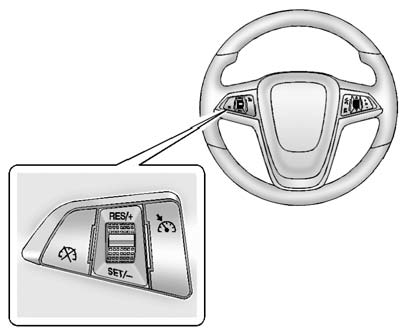
 (On/Off): Press to turn the cruise
control system on and off. An indicator light will turn on or off in the instrument
cluster.
(On/Off): Press to turn the cruise
control system on and off. An indicator light will turn on or off in the instrument
cluster.
 (Cancel): Press to disengage cruise
control without erasing the set speed from memory.
(Cancel): Press to disengage cruise
control without erasing the set speed from memory.
RES/+ (Resume/Accel): Move the thumbwheel up to resume to a previously set speed or to accelerate.
SET/− (Set/Coast): Move the thumbwheel down to set a speed and activate cruise control or to make the vehicle decelerate.
See also:
Safety Belts
This section of the manual describes how to use safety belts properly. It also
describes some things not to do with safety belts.
WARNING
Do not let anyone ride where a safety belt cannot be wor ...
GM Mobility Reimbursement Program (U.S. and Canada)
This program is available to
qualified applicants for cost
reimbursement of eligible
aftermarket adaptive equipment
required for the vehicle, such as
hand controls or a wheelchair/scooter ...
Global Off
Depending on the infotainment
system, the RSE system may have
a Global Off feature. The Global Off
feature disables all RSE system
features. Press and hold the radio
power button for more th ...