


Certification Label
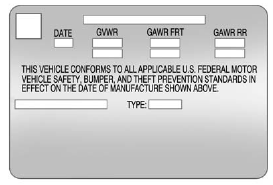
Label Example
A vehicle-specific Certification label, found on the vehicle center pillar (B-pillar), tells you the gross weight capacity of the vehicle, called the Gross Vehicle Weight Rating (GVWR). The GVWR includes the weight of the vehicle, all occupants, fuel, and cargo. Never exceed the GVWR for the vehicle, or the Gross Axle Weight Rating (GAWR) for either the front or rear axle.
And, if you do have a heavy load, you should spread it out. See “Steps for Determining Correct Load Limit” earlier in this section.
 WARNING
Do not load the vehicle any heavier than the Gross Vehicle Weight Rating (GVWR), or either the maximum front or rear Gross Axle Weight Rating (GAWR). This can cause systems to break and change the way the vehicle handles. This could cause loss of control and a crash. Overloading can also shorten the life of the vehicle.
If you put things inside the vehicle — like suitcases, tools, packages, or anything else — they will go as fast as the vehicle goes. If you have to stop or turn quickly, or if there is a crash, they will keep going.
WARNING
Things inside the vehicle can strike and injure people in a sudden stop or turn, or in a crash.
. Put things in the cargo area of the vehicle. In the cargo area, put them as far forward as possible. Try to spread the weight evenly.
. Never stack heavier things, like suitcases, inside the vehicle so that some of them are above the tops of the seats.
. Do not leave an unsecured child restraint in the vehicle.
. Secure loose items in the vehicle.
. Do not leave a seat folded down unless needed.
See also:
Airbag System
The vehicle has the following airbags:
• A frontal airbag for the driver.
• A frontal airbag for the right front passenger.
• A seat-mounted side impact airbag for the driver.
• A seat-mou ...
Rear Window Sunshade
On vehicles with a rear window
sunshade, the switch is on the
console to the right of the shift lever.
The sunshade only operates when
the ignition is in ON/RUN or ACC/ACCESSORY.
To open the s ...
Windows
CAUTION:
Leaving children, helpless adults, or pets
in a vehicle with the windows closed is
dangerous. They can be overcome by the
extreme heat and suffer permanent
injuries or even death from ...