


Turn and Lane-Change Signals
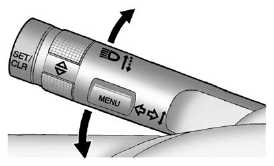
An arrow on the instrument panel cluster will flash in the direction of the turn or lane change.
Move the lever all the way up or down to signal a turn.
Raise or lower the lever until the arrow starts to flash to signal a lane change. The turn signal flashes three times.
The lever returns to its starting position when it is released.
If after signaling a turn or lane change the arrow flashes rapidly or does not come on, a signal bulb may be burned out. Have the bulbs replaced. If the bulb is not burned out, check the fuse. See Fuses and Circuit Breakers for more information.
See also:
Additional Factors Affecting System
Operation
Safety belts help keep the passenger in position on the
seat during vehicle maneuvers and braking, which
helps the passenger sensing system maintain the
passenger airbag status. See “Safety Be ...
Cupholders
Two cupholders are in the center console. Slide the door open to access them.
Cupholders may be located in the second row seat armrest. To access, pull the armrest down. ...
Instrument Panel
Instrument Panel
A. Exterior Lamp Controls.
Fog Lamps.
Instrument Panel Illumination Control.
B. Air Vents.
C. Turn and Lane Change Lever.
See Turn and Lane-Change Signals.
Driver Information ...