


Fuel Gauge
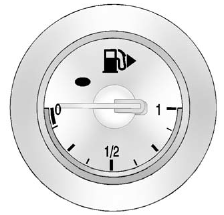
When the ignition is on, the fuel gauge tells you about how much fuel you have left in your tank.
An arrow on the fuel gauge indicates the side of the vehicle the fuel door is on.
When the fuel is low, a message may appear in the Driver Information Center (DIC), and a chime will sound. See Fuel System Messages for more information.
Here are four things that some owners ask about. None of these show a problem with your fuel gauge:
- At the service station, the fuel pump shuts off before the gauge reads full.
- It takes a little more or less fuel to fill up than the gauge indicated. For example, the gauge may have indicated the tank was half full, but it actually took a little more or less than half the tank's capacity to fill the tank.
- The gauge moves a little while turning a corner or speeding up.
- The gauge takes a few seconds to stabilize after the ignition is turned on, and will go back to empty when the ignition is turned off.
See also:
Using the Digit Store Command
The digit store command allows a phone number to be stored by entering the digits individually.
1. Press
.
► For vehicles without a navigation system, the system responds “Ready,” followe ...
Engine Compartment Fuse Block
To remove the fuse block cover, press the three retaining clips on the cover and lift it straight up.
Notice: Spilling liquid on any electrical component on the vehicle may damage it. Always keep t ...
Recreational Vehicle Towing
Recreational vehicle towing means towing the vehicle behind another vehicle –
such as behind a motor home. The two most common types of recreational vehicle towing
are known as dinghy towing and ...