


Replacement Bulbs
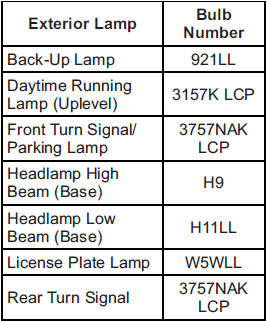
For replacement bulbs not listed here, contact your dealer.
See also:
Rear Compartment Fuse Block
The rear compartment fuse block, if equipped, is located on the left side of
the trunk behind a cover.
The vehicle may not be equipped with all of the fuses, relays, and features shown.
...
Manual Operation
(Power): Press to turn the fan
on or off.
(Fan Control): Press to
increase or decrease the fan speed.
The fan speed setting appears on
the main display. Pressing either
button cancels auto ...
Securing a Child Restraint in a Rear Outside Seat Position
If your child restraint has the LATCH system,
see Lower Anchors and Tethers for Children
(LATCH) on page 54.
If your child restraint does not have the LATCH
system, you will be using the lap-sho ...