


How to Add Coolant to the Coolant Surge Tank
WARNING!
You can be burned if you spill
coolant on hot engine parts.
Coolant contains ethylene glycol
and it will burn if the engine parts
are hot enough. Do not spill
coolant on a hot engine.
Notice:
This vehicle has a
specific coolant fill procedure.
Failure to follow this procedure
could cause the engine to
overheat and be severely
damaged.
WARNING!
An electric engine cooling fan
under the hood can start up even
when the engine is not running
and can cause injury. Keep
hands, clothing, and tools away
from any underhood electric fan.
WARNING!
Steam and scalding liquids from a
hot cooling system can blow out
and burn you badly. They are
under pressure, and if you turn
the surge tank pressure
cap—even a little—they can
come out at high speed. Never
turn the cap when the cooling
system, including the surge tank
pressure cap, is hot. Wait for the
cooling system and surge tank
pressure cap to cool if you ever
have to turn the pressure cap.

The coolant surge tank pressure cap can be removed when the cooling system, including the surge tank pressure cap and upper radiator hose, is no longer hot.
1. Turn the pressure cap slowly counterclockwise. If a hiss is heard, wait for that to stop.
A hiss means there is still some pressure left.
2. Keep turning the cap and remove it.
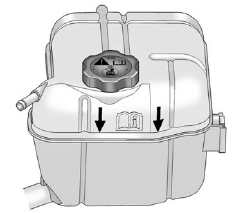
3. Fill the coolant surge tank with the proper mixture to the mark pointed to on the front of the coolant surge tank.
4. With the coolant surge tank cap off, start the engine and let it run until the upper radiator hose starts getting hot. Watch out for the engine cooling fans. By this time, the coolant level inside the coolant surge tank may be lower. If the level is lower, add more of the proper mixture to the coolant surge tank until the level reaches the mark pointed to on the front of the coolant surge tank.
5. Replace the cap. Be sure the cap is hand–tight and fully seated.
Notice:
If the pressure cap is not
tightly installed, coolant loss and
possible engine damage may
occur. Be sure the cap is properly
and tightly secured.
See also:
Selecting a Menu Option
1. Turn the Menu knob to move the
highlighted bar.
2. Press SELECT to select the
highlighted option. ...
FCC Information
See Radio Frequency Statement for information
regarding Part 15 of the Federal
Communications Commission (FCC)
rules and Industry Canada
Standards RSS-GEN/210/220/310. ...
Hill Start Assist (HSA)
Some vehicles have a Hill Start Assist (HSA) feature, which may be useful when the vehicle is stopped on a grade. This feature is designed to prevent the vehicle from rolling, either forward or rearwa ...