


Seat Adjustment
Manual Seats
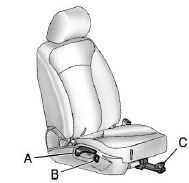
A. Seatback Recline Lever
B. Height Adjustment Switch
C. Seat Position Handle
To adjust the seat position:
1. Pull the handle (C) under the front of the seat cushion.
2. Slide the seat to the desired position and release the handle.
3. Try to move the seat back and forth to be sure it is locked in place.
Press and hold the top or bottom of the switch (B) to raise or lower the seat. Release the switch when the desired height is reached.
To raise or recline the seatback, use the lever (A) on the outboard side of the seat. See Reclining Seatbacks.
Power Seats
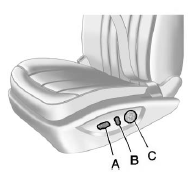
A. Power Seat Adjustment Control
B. Reclining Seatbacks
C. Lumbar Adjustment
To adjust a power seat, if equipped:
► Move the seat forward or rearward by sliding the control (A) forward or rearward.
► Raise or lower the front or rear part of the seat cushion by moving the front or rear of the control (A) up or down.
► Raise or lower the entire seat by moving the control (A) up or down.
See Power Seat Adjustment for more information.
To raise or recline the seatback, tilt the top of the control (B) forward or rearward. See Reclining Seatbacks.
Press the front or rear of the control (C) to increase or decrease lumbar support. See Lumbar Adjustment.
See also:
Brake System Warning Light
The vehicle brake system consists
of two hydraulic circuits. If one
circuit is not working, the remaining
circuit can still work to stop the
vehicle. For normal braking
performance, both cir ...
Tire Messages
TIRE PRESSURE LOW ADD AIR TO TIRE
On vehicles with the Tire Pressure Monitor System (TPMS), this message displays when the pressure in one or more of the vehicle's tires is low.
The low tire pressur ...
Heated Mirrors
For vehicles with heated mirrors:
(Rear Window Defogger):
Press to heat the mirrors.
See “Rear Window Defogger” under
Automatic Climate Control System for more information. ...