


StabiliTrak® System
The vehicle may have a vehicle stability enhancement system called StabiliTrak. It is an advanced computer-controlled system that assists with directional control of the vehicle in difficult driving conditions.
StabiliTrak activates when the computer senses a difference between the intended path and the direction the vehicle is actually traveling. StabiliTrak selectively applies braking pressure to the vehicle brakes to help steer the vehicle in the intended direction.
StabiliTrak comes on automatically whenever the vehicle is started. To assist with directional control of the vehicle, the system should always be left on.
When StabiliTrak activates,  flashes on the instrument panel.
A noise may be heard or vibration may be felt in the brake pedal. This is normal. Continue to steer the vehicle in the intended direction.
See Traction Control System (TCS)/StabiliTrak® Light for more information.
If a problem is detected with StabiliTrak, SERVICE STABILITRAK is displayed on the Driver Information Center (DIC).
See Ride Control System Messages. When this message
is displayed and comes on and
stays on, the vehicle is safe to drive
but the system is not operational.
Driving should be adjusted accordingly.
If comes on and stays on, reset
the system.
To reset:
1. Stop the vehicle.
2. Turn the engine off and wait 15 seconds.
3. Start the engine.
If still comes on and stays on, the
vehicle needs service.
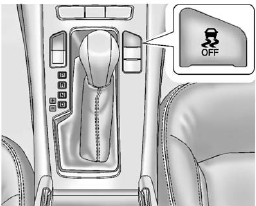
• To turn off both StabiliTrak and
TCS, press and hold the TCS/StabiliTrak button, located on the
instrument panel, until  and
and
 illuminate and the appropriate
DIC message is displayed. See
Ride Control System Messages.
illuminate and the appropriate
DIC message is displayed. See
Ride Control System Messages.
When StabiliTrak is turned off, the system will not assist with directional control of the vehicle or limit wheel spin. Driving should be adjusted accordingly.
See Traction Control System (TCS)/StabiliTrak® Light for more information.
• Press and release the TCS/StabiliTrak button again to turn the system back on.
If cruise control is being used when StabiliTrak activates, cruise control will automatically disengage. Press the cruise control button to reengage when road conditions allow. See Cruise Control for more information.
See also:
Vehicle Data Recording and
Privacy
Your GM vehicle has a number of sophisticated
computers that record information about the vehicle’s
performance and how it is driven. For example, your
vehicle uses computer modules to monitor ...
High Voltage Devices and Wiring
WARNING!
Exposure to high voltage can
cause shock, burns, and even
death. The high voltage
components in the vehicle can
only be serviced by technicians
with special training.
High voltage ...
Verify Minutes and Expiration
Push and say “minutes” then
“verify” to check how many minutes
remain and their expiration date. ...