


Adjusting the EQ (Equalizer)
For vehicles with an equalizer:
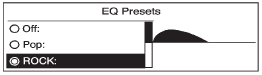
1. Press the TONE button.
2. Select EQ.
3. Select the setting.
Press the  BACK button to go
back to the Tone Settings menu.
BACK button to go
back to the Tone Settings menu.
See also:
Driver Information Center (DIC)
The Driver Information Center (DIC) display is
located on the instrument panel cluster, below the
speedometer. If your vehicle has DIC buttons,
they are located on the steering wheel. The DIC
can ...
When to Check
Check the tires once a month or more. Do not forget the compact spare tire, if
the vehicle has one. The cold compact spare should be at 420 kPa (60 psi). For additional
information regarding the c ...
Dinghy Towing
Dinghy Towing
Notice:
If the vehicle is towed
with all four wheels on the
ground, the drivetrain
components could be damaged.
The repairs would not be covered
by the vehicle warranty. Do ...