


Submenus
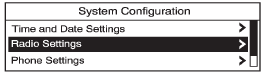
An arrow on the right-hand edge of the menu indicates that it has a submenu with other options.
See also:
Window Messages
OPEN, THEN CLOSE DRIVER WINDOW
This message is displayed when the window needs to be reprogrammed.
If the vehicle's battery has been recharged or disconnected, you will need to reprogram each front ...
XM™ Satellite Radio AntennaSystem
The XM™ Satellite Radio antenna is located on
the roof of your vehicle. Keep this antenna clear of
snow and ice build up for clear radio reception.
If your vehicle has a sunroof, the performanc ...
Recalling Button Memory
Positions
To recall the manually saved Button
Memory positions, press and hold
“1” or “2.” The driver seat and
outside mirrors move to the
positions stored to those buttons
when pressed. Relea ...