


Driver Efficiency Gauge
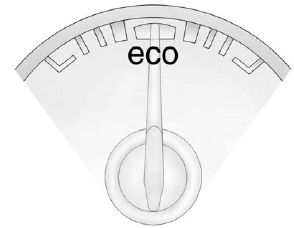
For eAssist vehicles, this gauge assists in driving efficiently and will vary based on driver input.
To maximize efficiency, keep the gauge pointed in the solid green zone in the center of the gauge.
The gauge moves to the left when braking and to the right when accelerating. When either is done aggressively, the vehicle is being driven less efficiently and the gauge will move further from the center.
See also:
LaCrosse Super
The LaCrosse Super is distinguished from its sibling models with a new
exterior appearance that is highlighted by a new waterfall grille, new hood and
a new front fascia that incorporates a lower ...
Average Fuel Economy/Instantaneous Fuel Economy
On some models, this display
shows Average Fuel Economy. On
other models, this display shows
both Average Fuel Economy and
Instantaneous Fuel Economy.
The Average Fuel Economy display
shows ...
Bulb Replacement
For the proper type of replacement bulbs, see Replacement Bulbs .
For any bulb-changing procedure not listed in this section, contact your dealer. ...