


Lumbar Adjustment
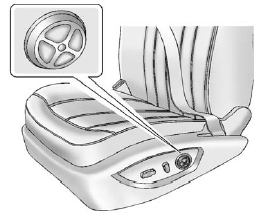
Lumbar Adjustment
If available, press and hold the front or rear of the control to increase or decrease lumbar support.
To raise or lower lumbar support, press and hold the top or bottom of the control.
Release the control when the seatback reaches the desired level of lumbar support.
See Power Seat Adjustment for more information.
See also:
License Plate Lamp
To replace one of these bulbs:
1. Remove the license plate.
2. Reach up through the opening above the license
plate to access the two license plate lamps.
3. Turn the socket counterclockwise to r ...
2.0 L L4 Engine Shown, 2.4 L L4 Engine Similar
1. Remove the coolant surge tank pressure cap when the cooling system, including the coolant surge tank pressure cap and upper radiator hose, is no longer hot.
Turn the pressure cap slowly counterc ...
General Information
For service and parts needs, visit your dealer. You will receive genuine GM parts and GM-trained and supported service people.
Genuine GM parts have one of these marks:
...