


Seat Position
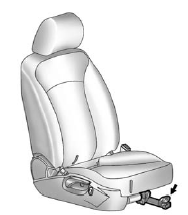
Seat Position
WARNING!
You can lose control of the
vehicle if you try to adjust a
manual driver seat while the
vehicle is moving. The sudden
movement could startle and
confuse you, or make you push a
pedal when you do not want to.
Adjust the driver seat only when
the vehicle is not moving.
To adjust the seat position:
1. Pull the handle under the front of the seat cushion.
2. Slide the seat to the desired position and release the handle.
3. Try to move the seat back and forth to be sure it is locked in place.
See also:
Dual Tone Multi-Frequency
(DTMF) Tones
The in-vehicle Bluetooth system can
send numbers during a call. This is
used when calling a menu-driven
phone system.
1. Turn the Menu knob to select
Enter Number, then press
SELECT.
2. En ...
Operation
(Off): Turns the climate
control system off. Outside
air still enters the vehicle and is directed to the floor. The
airflow direction and temperature can be adjusted.
Temperature Control: Turn ...
Storing an XM Channel as a Favorite
Channels from all bands can be stored in any order in the favorite pages.
Up to six channels can be stored in each favorite page and the number of available
favorite pages can be set.
Storing a Ch ...