


Manual Seats
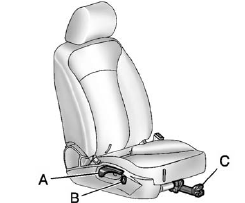
Manual Seats
A. Seatback Recline Lever
B. Height Adjustment Switch
C. Seat Position Handle
To adjust the seat position:
1. Pull the handle (C) under the front of the seat cushion.
2. Slide the seat to the desired position and release the handle (C).
3. Try to move the seat back and forth to be sure it is locked in place.
Press and hold the top or bottom of the switch (B) to raise or lower the seat. Release the switch (B) when the desired height is reached.
To raise or recline the seatback, use the lever (A) on the outboard side of the seat.
See Seat Adjustment and Reclining Seatbacks for more information.
See also:
Reprogramming Universal Home
Remote Buttons
Any of the three buttons can be reprogrammed by
repeating the instructions. ...
Stereo RCA Jacks
The RCA jacks are located behind the video
screen. The RCA jacks allow audio and video
signals to be connected from an auxiliary device
such as a camcorder or a video game unit to
the RSE system. ...
Remote Lock/ Unlock/ Start
Select Remote Lock Unlock, Start and the following will be displayed (depending
on the system):
Remote Lock Feedback
Remote Door Unlock
Remote Unlock Feedback
Remote Lock Feedback
This a ...