


Capacities and Specifications
Buick Regal / Buick Regal Owners Manual / Technical Data / Vehicle Data / Capacities and Specifications
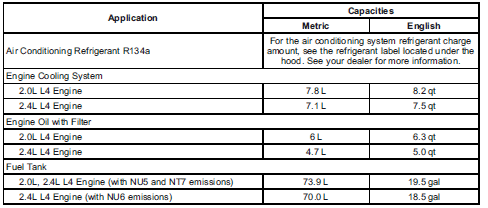
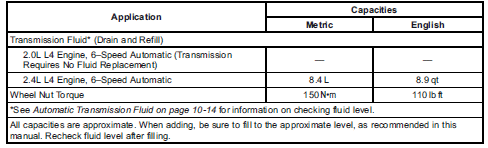
Engine Specifications

See also:
Service
Never try to do your own service on
eAssist components. You can be
injured and the vehicle can be
damaged if you try to do your own
service work. Service and repair of
these high voltage com ...
Radio Data System (RDS)
The audio system has a Radio Data System (RDS).
RDS features are available for use only on FM
stations that broadcast RDS information.
With RDS, the radio can do the following:
• Seek to s ...
Accessory Power Outlet(s)
The accessory power outlets can be used to plug in
electrical equipment, such as a cellular telephone.
The vehicle may have up to three power outlets
depending on the type of front seat installed ...