


License Plate Lamp
To replace one of these bulbs:
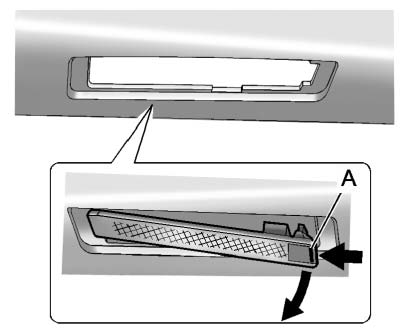 Passenger Side Shown, Driver Side Similar
1. Push the release tab (A) toward the lamp assembly.
2. Pull the lamp assembly down to remove.
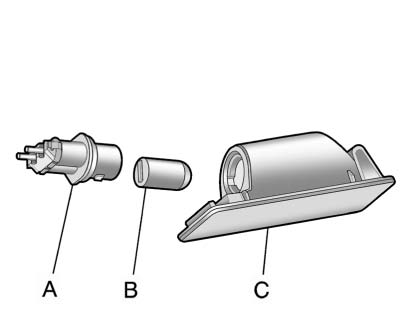
A. Bulb Socket
B. Bulb
C. Lamp Assembly
3. Turn the bulb socket (A) counterclockwise to remove it from the lamp assembly (C).
4. Pull the bulb (B) straight out of the bulb socket.
5. Push the replacement bulb straight into the bulb socket and turn the bulb socket clockwise to install it into the lamp assembly.
6. Push the lamp assembly back into position until the release tab locks into place.
See also:
Sun Visor Lamps
This lamp turns on when the cover
is opened. ...
Finish Care
Occasional waxing or mild polishing of the vehicle by hand may be necessary to remove residue from the paint finish. Approved cleaning products can be obtained from your dealer.
If the vehicle has a ...
Tire Rotation
Tires should be rotated every 12 000 km (7,500 mi). See Maintenance Schedule
.
Tires are rotated to achieve a uniform wear for all tires. The first rotation
is the most important.
Any time unusu ...