


Replacement Bulbs
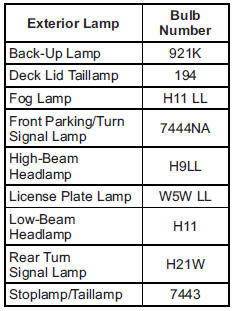
For replacement bulbs not listed here, contact your dealer.
See also:
Passing
More passing distance is needed
when towing a trailer. Because the
rig is longer, it is necessary to go
farther beyond the passed vehicle
before returning to the lane. ...
Power Outlets
The accessory power outlet can be used to plug in electrical equipment, such as a cell phone, an MP3 player, etc.
This outlet is located under the armrest inside the center console storage.
The vehi ...
Ignition Positions (Keyless Access)
The vehicle has an electronic keyless ignition with pushbutton start.
Pressing the button cycles it through three modes: ACC/ACCESSORY, ON/RUN/START,
and Stopping the Engine/OFF.
The transmitter ...