


Windshield Wiper/Washer
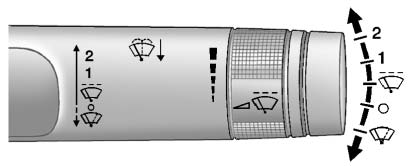
The windshield wiper lever is on the side of the steering column. With the ignition in ACC/ ACCESSORY or ON/RUN, move the windshield wiper lever to select the wiper speed.
2: Use for fast wipes.
1: Use for slow wipes.

 (Adjustable Interval Wipes):
Turn the band up for more frequent wipes or down for less frequent wipes.
 (Off): Use to turn the windshield wipers off.
 (Mist): For a single wipe, briefly move the wiper lever down.
For several wipes, hold the wiper lever down.
Clear ice and snow from the wiper blades before using them. If they are frozen to the windshield, carefully loosen or thaw them.
Damaged wiper blades should be replaced. See Wiper Blade Replacement .
Heavy snow or ice can overload the wipers. A circuit breaker stops them until the motor cools.
Wipe Parking
If the ignition is turned to LOCK/ OFF while the wipers are on 1, 2, or , they will immediately stop.
If the windshield wiper lever is then moved to OFF before the driver door is opened, or within 10 minutes, the wipers will restart and move to the base of the windshield.
If the ignition is turned to LOCK/ OFF during a windshield wash, the wipers will stop when they reach the base of the windshield.
Windshield Washer
Pull the windshield wiper lever toward you to spray windshield washer fluid and activate the wipers.
The wipers will continue until the lever is released or the maximum wash time is reached.
When the windshield wiper lever is released, additional wipes may occur depending on how long the windshield washer had been activated. See Washer Fluid for information on filling the windshield washer fluid reservoir.
 WARNING
In freezing weather, do not use the washer until the windshield is warmed. Otherwise the washer fluid can form ice on the windshield, blocking your vision.
See also:
Window Messages
OPEN, THEN CLOSE DRIVER WINDOW
This message is displayed when the window needs to be reprogrammed. If the vehicle's
battery has been recharged or disconnected, you will need to reprogram each f ...
Passenger Airbag Status Indicator
The vehicle has a passenger sensing system. See Passenger Sensing System
for important safety information. The instrument panel has a passenger airbag status
indicator.
When the vehicle i ...
Center Flex Storage Unit
This vehicle may have a center flex storage unit that
includes a front center seat with a lap belt and an
underseat storage compartment. The center seatback
can also be used as an armrest. Cupho ...