


Filling the Tank
 WARNING
Fuel vapor burns violently and a fuel fire can cause bad injuries. To help avoid injuries to you and others, read and follow all the instructions on the fuel pump island. Turn off the engine when refueling. Do not smoke near fuel or when refueling the vehicle. Do not use cellular phones. Keep sparks, flames, and smoking materials away from fuel. Do not leave the fuel pump unattended when refueling the vehicle. This is against the law in some places. Do not re-enter the vehicle while pumping fuel. Keep children away from the fuel pump; never let children pump fuel.
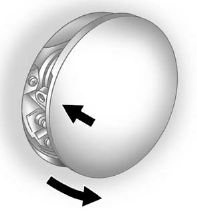
The tethered fuel cap is behind the fuel door on the vehicle's passenger side. Turn the fuel cap counterclockwise to remove. Reinstall the cap by turning it clockwise until it clicks.
WARNING
Fuel can spray out on you if you open the fuel cap too quickly. If you spill fuel and then something ignites it, you could be badly burned. This spray can happen if the tank is nearly full, and is more likely in hot weather. Open the fuel cap slowly and wait for any hiss noise to stop. Then unscrew the cap all the way.
Do not top off or overfill the tank. Wait a few seconds before removing the nozzle. Clean fuel from painted surfaces as soon as possible. See Exterior Care .
WARNING
If a fire starts while you are refueling, do not remove the nozzle. Shut off the flow of fuel by shutting off the pump or by notifying the station attendant. Leave the area immediately.
 Notice: If a new fuel cap is needed, be sure to get the right type of cap from
your dealer. The wrong type of fuel cap might not fit properly, might cause the
malfunction indicator lamp to light, and could damage the fuel tank and emissions
system. See Malfunction Indicator Lamp .
Notice: If a new fuel cap is needed, be sure to get the right type of cap from
your dealer. The wrong type of fuel cap might not fit properly, might cause the
malfunction indicator lamp to light, and could damage the fuel tank and emissions
system. See Malfunction Indicator Lamp .
See also:
Adding Equipment to Your Airbag-Equipped Vehicle
Q: Is there anything I might add to the front
or sides of the vehicle that could keep the
airbags from working properly?
A: Yes. If you add things that change your
vehicle’s frame, bumper system ...
Malfunction Indicator Lamp
A computer system called OBD II
(On-Board Diagnostics-Second
Generation) monitors the operation
of the vehicle to ensure emissions
are at acceptable levels, to produce
a cleaner environment. ...
Engine Oil Additives/Engine Oil Flushes
Do not add anything to the oil. The recommended oils with the dexos specification and displaying the dexos certification mark are all that is needed for good performance and engine protection.
Engine ...