


Lap-Shoulder Belt
All seating positions in the vehicle have a lap-shoulder belt.
The following instructions explain how to wear a lap-shoulder belt properly.
1. Adjust the seat, if the seat is adjustable, so you can sit up straight. To see how, see “Seats” in the Index.
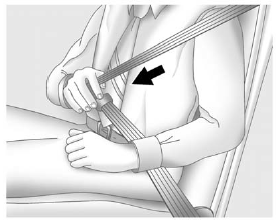
2. Pick up the latch plate and pull the belt across you. Do not let it get twisted.
The lap-shoulder belt may lock if you pull the belt across you very quickly. If this happens, let the belt go back slightly to unlock it. Then pull the belt across you more slowly.
If the shoulder portion of a passenger belt is pulled out all the way, the child restraint locking feature may be engaged. If this happens, let the belt go back all the way and start again.
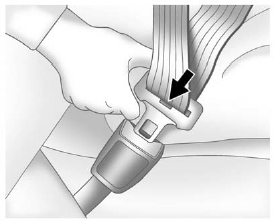
3. Push the latch plate into the buckle until it clicks.
Pull up on the latch plate to make sure it is secure. If the belt is not long enough, see Safety Belt Extender .
Position the release button on the buckle so that the safety belt could be quickly unbuckled if necessary.
If equipped with a shoulder belt height adjuster, move it to the height that is right for you. See “Shoulder Belt Height Adjuster” later in this section for instructions on use and important safety information.
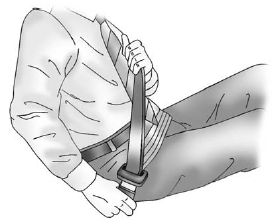
4. To make the lap part tight, pull up on the shoulder belt.
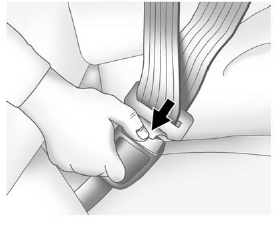
To unlatch the belt, push the button on the buckle. The belt should return to its stowed position.
Before a door is closed, be sure the safety belt is out of the way. If a door is slammed against a safety belt, damage can occur to both the safety belt and the vehicle.
See also:
Bluetooth
The Bluetooth system allows users with a Bluetooth-enabled cell phone to make and receive hands-free calls using the vehicle audio system, microphone, and controls.
The Bluetooth-enabled cell phone m ...
XM Satellite Radio Service
XM is a satellite radio service based in the 48 contiguous United States and
10 Canadian provinces. XM Satellite Radio has a wide variety of programming and
commercial-free music, coast to coast, ...
Courtesy Transportation
To enhance your ownership experience, we and
our participating dealers are proud to offer
Courtesy Transportation, a customer support
program for new vehicles.
For warranty repairs during the Bu ...