


Driver Information Center (DIC)
The DIC display is located in the center of the instrument panel cluster. It shows the status of many vehicle systems. The controls for the DIC are located on the turn signal lever.
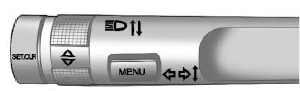
SET/CLR: Press to set or clear the menu item when it is displayed.
 : Use the thumbwheel to scroll through the items in each menu.
MENU: Press to get to the Trip/ Fuel Menu and the Vehicle Information Menu.
For more information, see Driver Information Center (DIC) .
See also:
Tire Inspection
We recommend that the tires,
including the spare tire, if the
vehicle has one, be inspected
for signs of wear or damage at
least once a month.
Replace the tire if:
• The indicators at thre ...
Removing the Spare Tire and
Tools
The equipment you need is located
in the trunk.
1. Open the trunk.
2. Remove the spare tire cover.
3. Turn the retainer nut
counterclockwise and remove
the spare tire.
4. Place the spare t ...
XM™ Satellite Radio Service
XM is a satellite radio service that is based in the
48 contiguous United States and 10 Canadian provinces.
XM Satellite Radio has a wide variety of programming
and commercial-free music, coast-t ...