


Removal and Installation of the Sealant Canister
To remove the sealant canister:
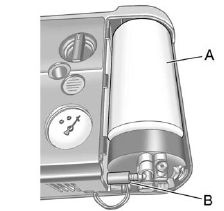
1. Remove the plastic cover.
2. Unscrew the connector (B) from the canister (A).
3. Pull up on the canister (A) to remove it.
4. Replace with a new canister which is available from your dealer.
5. Push the new canister into place.
6. Screw the connector (B) to the canister (A).
7. Slide the plastic cover back on.
See also:
Driving for Better Fuel Economy
Driving habits can affect fuel
mileage. Here are some driving tips
to get the best fuel economy
possible.
• Avoid fast starts and accelerate
smoothly.
• Brake gradually and avoid
abrup ...
How Does an Airbag Restrain?
In moderate to severe frontal or near frontal
collisions, even belted occupants can contact
the steering wheel or the instrument panel.
In moderate to severe side collisions, even belted
occupan ...
How Does an Airbag Restrain?
In moderate to severe frontal or near frontal collisions, even belted occupants
can contact the steering wheel or the instrument panel. In moderate to severe side
collisions, even belted occupants ...