


Battery
This vehicle has a standard 12-volt battery. Refer to the replacement number on the original battery label when a new standard 12-volt battery is needed.
eAssist vehicles also have a high voltage battery. Only a trained service technician with the proper knowledge and tools should inspect, test, or replace the high voltage battery. See your dealer if the high voltage battery needs service. The dealer has information on how to recycle the high voltage battery.
There is also information available at http://www.recyclemybattery.com.
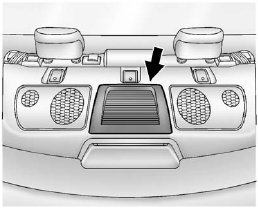
The eAssist system high voltage battery is cooled with air drawn from the vehicle interior. The cold air intake for the battery is located behind the rear seat, on the filler panel. Do not cover the intake.
WARNING!
Battery posts, terminals, and
related accessories contain lead
and lead compounds, chemicals
known to the State of California to
cause cancer and reproductive
harm. Wash hands after handling.
Vehicle Storage
WARNING!
Batteries have acid that can burn
you and gas that can explode.
You can be badly hurt if you are not careful. See Jump Starting (On-board with eAssist Only) or Jump Starting (with or without eAssist) for tips on working around a battery without getting hurt.
Infrequent Usage: Remove the 12-volt battery black, negative (−) cable from the battery to keep the battery from running down.
Extended Storage: Remove the 12-volt battery black, negative (−) cable from the battery or use a battery trickle charger.
Remember to reconnect the battery when ready to drive the vehicle.
See also:
Adjusting the Treble, Midrange,
and Bass
1. Press the TONE button.
2. Select Treble, Midrange,
or Bass.
3. Select the value.
Press the BACK button to go
back to the Tone Settings menu. ...
Headlamp High/ Low-Beam Changer
Headlamp High/Low-Beam Changer: Push the turn signal/lane change lever away from you and release, to turn the high beams on.
To return to low beams, push the lever again or pull it toward you and ...
Anti-Lock Brake SystemWarning Light
With the Anti-Lock
Brake System (ABS),
this light will come
on when you start your
engine and may
stay on for several
seconds, that is normal.
A chime may also sound when the light comes on ...